0.x — pre-release, no compatibility promise yet.What this means
Connect
What this is: adding Taskadence to your AI client. When you need it: once per client — after that the client stays signed in.
https://api.taskadence.com/mcpSign in
Section titled “Sign in”- Authorize — the client registers itself and sends you to Taskadence. Sign in and choose the organization.
- Consent — Taskadence names the client and lists the scopes it asks for. You approve once per client and organization.
- Done — the client holds a token and refreshes it itself. Nothing to paste.
| On the consent screen | |
|---|---|
| The client | Marked as registered by itself and not reviewed by Taskadence — connect only if you started this from an app you trust. |
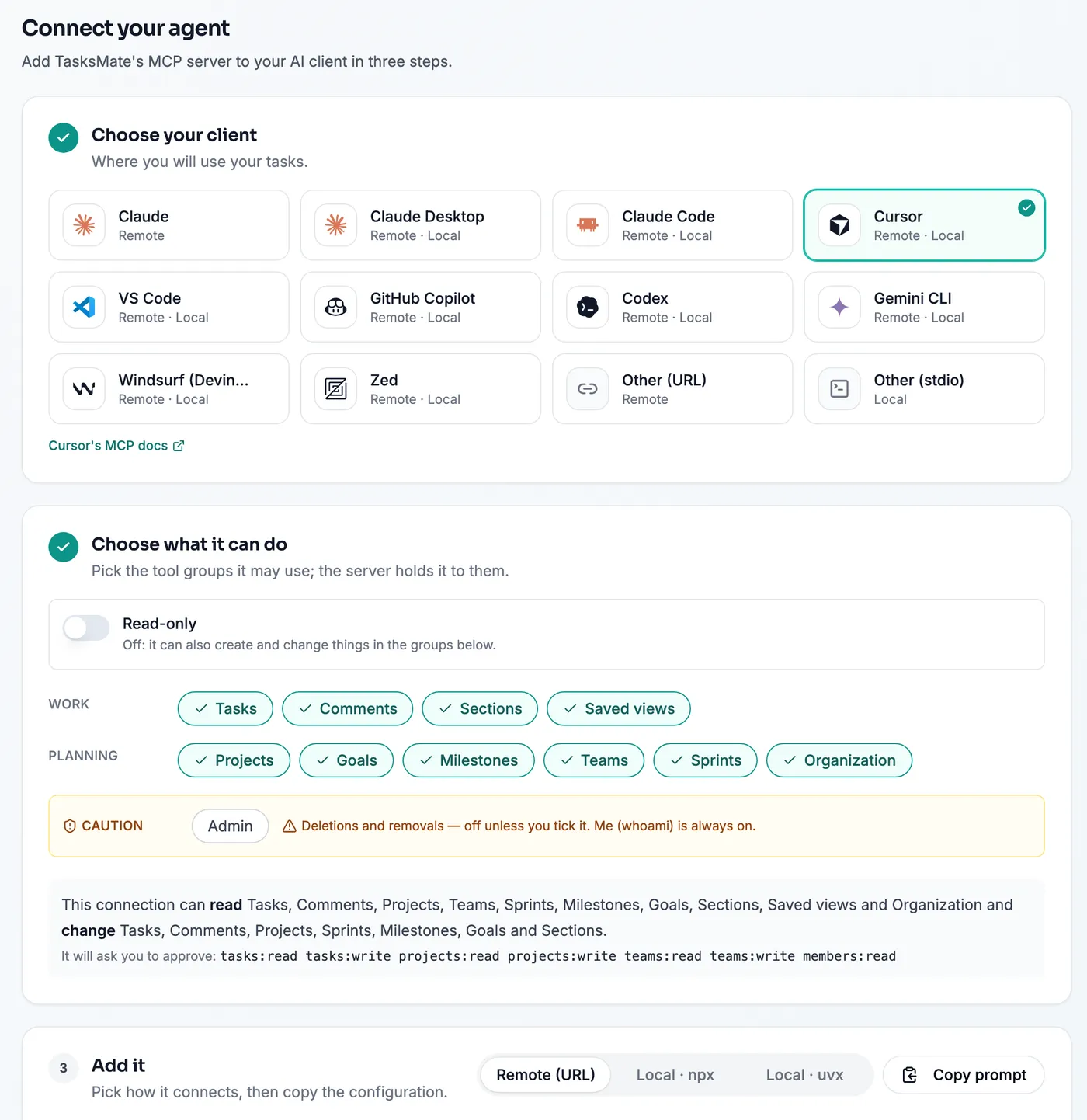
| Scopes | Follow the URL’s groups (below). Untick what the client should not do; a read stays ticked while its write is. |
| Organization | Named when you have one where you may connect, a picker when you have several. The connection acts in that one only. |
| Next time | The same client asking for no more than you approved goes straight through; asking for more shows the screen again. |
Your client
Section titled “Your client”In Customize → Connectors → Add custom connector:
Name: TaskadenceURL: https://api.taskadence.com/mcpSign in: Connect → you are sent to Taskadence to sign in and approve.
In Customize → Connectors → Add custom connector:
Name: TaskadenceURL: https://api.taskadence.com/mcpSign in: Connect → you are sent to Taskadence to sign in and approve.
Local package: claude_desktop_config.json (Settings → Developer → Edit Config)
{ "mcpServers": { "taskadence": { "command": "npx", "args": ["-y", "@taskadence/mcp"], "env": {"TASKADENCE_TOKEN": "$TASKADENCE_TOKEN"} } }}{ "mcpServers": { "taskadence": { "command": "uvx", "args": ["taskadence-mcp"], "env": {"TASKADENCE_TOKEN": "$TASKADENCE_TOKEN"} } }}Run in a terminal:
claude mcp add --transport http taskadence "https://api.taskadence.com/mcp"Sign in: Run /mcp in Claude Code, choose taskadence → Authenticate.
Local package
claude mcp add --env TASKADENCE_TOKEN=$TASKADENCE_TOKEN --transport stdio taskadence -- npx -y @taskadence/mcpclaude mcp add --env TASKADENCE_TOKEN=$TASKADENCE_TOKEN --transport stdio taskadence -- uvx taskadence-mcpAdd to .cursor/mcp.json:
{ "mcpServers": { "taskadence": { "url": "https://api.taskadence.com/mcp" } }}Sign in: Cursor shows Needs login on the server → sign in to Taskadence.
Local package
{ "mcpServers": { "taskadence": { "command": "npx", "args": ["-y", "@taskadence/mcp"], "env": {"TASKADENCE_TOKEN": "$TASKADENCE_TOKEN"} } }}{ "mcpServers": { "taskadence": { "command": "uvx", "args": ["taskadence-mcp"], "env": {"TASKADENCE_TOKEN": "$TASKADENCE_TOKEN"} } }}Add to .vscode/mcp.json:
{ "servers": { "taskadence": { "type": "http", "url": "https://api.taskadence.com/mcp" } }}Sign in: Start the server → VS Code asks to sign in to Taskadence.
Local package
{ "servers": { "taskadence": { "type": "stdio", "command": "npx", "args": ["-y", "@taskadence/mcp"], "env": {"TASKADENCE_TOKEN": "$TASKADENCE_TOKEN"} } }}{ "servers": { "taskadence": { "type": "stdio", "command": "uvx", "args": ["taskadence-mcp"], "env": {"TASKADENCE_TOKEN": "$TASKADENCE_TOKEN"} } }}Add to .vscode/mcp.json:
{ "servers": { "taskadence": { "type": "http", "url": "https://api.taskadence.com/mcp" } }}Sign in: Copilot Chat, agent mode: start the server → sign in to Taskadence.
Local package
{ "servers": { "taskadence": { "type": "stdio", "command": "npx", "args": ["-y", "@taskadence/mcp"], "env": {"TASKADENCE_TOKEN": "$TASKADENCE_TOKEN"} } }}{ "servers": { "taskadence": { "type": "stdio", "command": "uvx", "args": ["taskadence-mcp"], "env": {"TASKADENCE_TOKEN": "$TASKADENCE_TOKEN"} } }}Run in a terminal:
codex mcp add taskadence --url "https://api.taskadence.com/mcp"codex mcp login taskadenceSign in: The second line opens the Taskadence sign-in.
Local package
codex mcp add taskadence --env TASKADENCE_TOKEN=$TASKADENCE_TOKEN -- npx -y @taskadence/mcpcodex mcp add taskadence --env TASKADENCE_TOKEN=$TASKADENCE_TOKEN -- uvx taskadence-mcpRun in a terminal:
gemini mcp add --transport http taskadence "https://api.taskadence.com/mcp"Sign in: Run /mcp auth taskadence in Gemini CLI.
Local package
gemini mcp add -e TASKADENCE_TOKEN=$TASKADENCE_TOKEN taskadence npx -- -y @taskadence/mcpgemini mcp add -e TASKADENCE_TOKEN=$TASKADENCE_TOKEN taskadence uvx -- taskadence-mcpAdd to ~/.config/devin/mcp_config.json (Windows: %APPDATA%\devin\mcp_config.json):
{ "mcpServers": { "taskadence": { "serverUrl": "https://api.taskadence.com/mcp" } }}Sign in: Refresh the MCP servers → sign in to Taskadence.
Local package
{ "mcpServers": { "taskadence": { "command": "npx", "args": ["-y", "@taskadence/mcp"], "env": {"TASKADENCE_TOKEN": "$TASKADENCE_TOKEN"} } }}{ "mcpServers": { "taskadence": { "command": "uvx", "args": ["taskadence-mcp"], "env": {"TASKADENCE_TOKEN": "$TASKADENCE_TOKEN"} } }}Add to Zed settings.json:
{ "context_servers": { "taskadence": { "url": "https://api.taskadence.com/mcp" } }}Sign in: Zed asks to authenticate the server → sign in to Taskadence.
Local package
{ "context_servers": { "taskadence": { "command": "npx", "args": ["-y", "@taskadence/mcp"], "env": {"TASKADENCE_TOKEN": "$TASKADENCE_TOKEN"} } }}{ "context_servers": { "taskadence": { "command": "uvx", "args": ["taskadence-mcp"], "env": {"TASKADENCE_TOKEN": "$TASKADENCE_TOKEN"} } }}In Your client's remote MCP server settings:
Transport: Streamable HTTPURL: https://api.taskadence.com/mcpSign in: An OAuth-capable client signs in by itself; any other sends Authorization: Bearer <token>.
Local package: Your client's MCP configuration
{ "mcpServers": { "taskadence": { "command": "npx", "args": ["-y", "@taskadence/mcp"], "env": {"TASKADENCE_TOKEN": "$TASKADENCE_TOKEN"} } }}{ "mcpServers": { "taskadence": { "command": "uvx", "args": ["taskadence-mcp"], "env": {"TASKADENCE_TOKEN": "$TASKADENCE_TOKEN"} } }}The server enforces two URL options: ?readonly=1 and ?groups=tasks,projects — see Security.
| URL | Scopes the client asks for |
|---|---|
/mcp |
tasks:read tasks:write projects:read projects:write teams:read teams:write members:read |
/mcp?readonly=1 |
tasks:read projects:read teams:read members:read |
/mcp?groups=tasks |
tasks:read tasks:write teams:read members:read |
/mcp?groups=tasks,admin |
the same, plus admin |
Local packages
Section titled “Local packages”npx -y @taskadence/mcp and uvx taskadence-mcp proxy the remote server over stdio — the same tools and
enforcement — with an access token from Developers → Tokens.
{ "mcpServers": { "taskadence": { "command": "npx", "args": ["-y", "@taskadence/mcp"], "env": {"TASKADENCE_TOKEN": "$TASKADENCE_TOKEN"} } }}{ "mcpServers": { "taskadence": { "command": "uvx", "args": ["taskadence-mcp"], "env": {"TASKADENCE_TOKEN": "$TASKADENCE_TOKEN"} } }}| Variable | Flag | |
|---|---|---|
TASKADENCE_TOKEN |
— | Required: the access token (never a flag). |
TASKADENCE_API_URL |
--api-url |
The API’s origin. Default: production; /mcp is added. |
TASKADENCE_MCP_READONLY |
--readonly |
1 → ?readonly=1: only tools that read. |
TASKADENCE_MCP_GROUPS |
--groups |
tasks,projects → ?groups=…: only those tool groups. |
Flags win. Both are pre-release (0.x) and not yet on npm or PyPI.
Generate it in the app
Section titled “Generate it in the app”Developers → MCP writes this for your client with Read-only and the tool groups built in, mints a token for the choice when one is needed, and has Copy prompt.